
Problem
This article provides three solutions that have been known to resolve the SOLIDWORKS "Object expected" script error shown below.
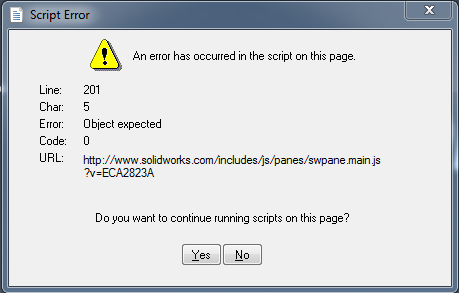
This script error has been reported to appear intermittently when starting SOLIDWORKS. In some cases, it has been found to be caused by an unregistered DLL file.
Solution 1: Repair SolidWorks
Follow the steps in this Article to repair SOLIDWORKS:
How to Repair SOLIDWORKS – Hawk Ridge Systems
Solution 2: Reregister the DLL File
If a repair does not resolve the issue, the vbscript.dll file may need to be manually registered.
- In Windows Explorer, go into the C:\Windows\System32 directory and find the vbscript.dll (search the system for the DLL if necessary)
- Open Command Prompt as an administrator.
- Type regsvr32<space>
- Drag & drop the DLL from Windows Explorer into the command prompt and hit Enter
- Attempt to launch SolidWorks again.
Solution 3: Set Default Internet Program
In cases where the problem persists, the following steps have also been known to resolve the issue.
1. Open Control Panel and navigate to Programs > Default Programs > Set your default programs
2. Click on Internet Explorer and select Set this program as default
3. Make sure that htm and html file types are not selected for any browsers other than Internet Explorer
4. Click OK
5. Open Control Panel and navigate to Programs > Default Programs > Set program access and computer defaults
6. Choose Microsoft Windows and click OK
For additional support, existing customers can submit a ticket or new customers can contact Hawk Ridge Systems.
Comments
Article is closed for comments.