
Problem
This article describes how to delete a PDM Vault View. This may be useful for the following scenarios:
- The Admin user is prohibiting access to the Vault
- The Vault View has become corrupted
- Computer changes include a hard drive change
Solution
- Ensure that all files are checked in the Vault
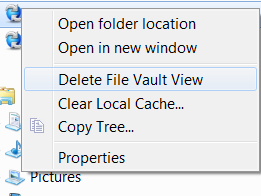
- Right-click on the Vault and select "Delete File Vault View" as shown in the image below
- There may be a logon screen. If so, go ahead and log in.
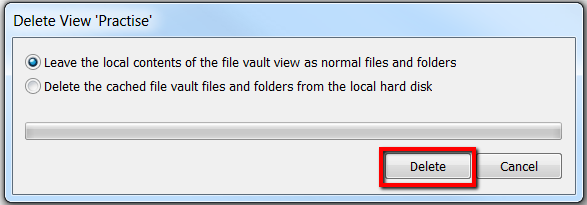
- Please select the required option on the screen, then click on "Delete" as shown below. Note: If the option 'Delete the cached file vault files and folders from the local hard disk' is selected, all local files in your Vault View will be deleted.
For additional support, existing customers can submit a ticket or new customers can contact Hawk Ridge Systems.
Comments
Article is closed for comments.