
Problem
This article walks through the steps necessary to resolve an issue where the 'Next' icon cannot be clicked after launching the SOLIDWORKS Installation Manager. This issue was seen with SOLIDWORKS 2016 and older.
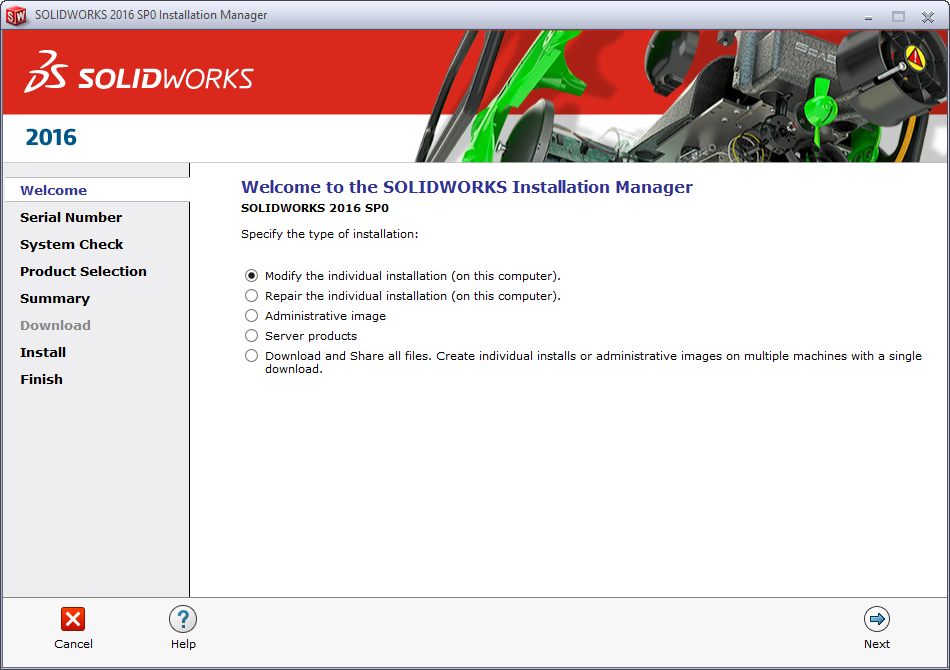
The issue itself has previously been associated with corrupt or invalid Internet Explorer settings. If it has been confirmed that the machine in question is running a supported version of Internet Explorer after reviewing the "Microsoft Products" section of the SOLIDWORKS System Requirements Page, then the troubleshooting steps in the following section can be attempted.
Solution
- Close all currently open programs and windows, including the SOLIDWORKS Installation Manager
- Launch Internet Explorer
- Click on the "Settings" icon (gear icon) and select "Internet options"
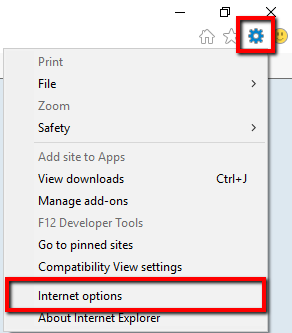
- In the new "Internet Options" window, navigate to the "Advanced" tab.
- In the "Advanced" tab, click on "Reset...". This will reset all Internet Explorer settings back to default.

- Launch the SOLIDWORKS Installation Manager again to install SOLIDWORKS.
For additional support, existing customers can submit a ticket or new customers can contact Hawk Ridge Systems.
Comments
Great article!!
Article is closed for comments.